Set Up an AirTag to Track Your Things
Pair an AirTag with your iPhone in Find My, then use Precision Finding to locate keys, bags, and more down to the exact spot.
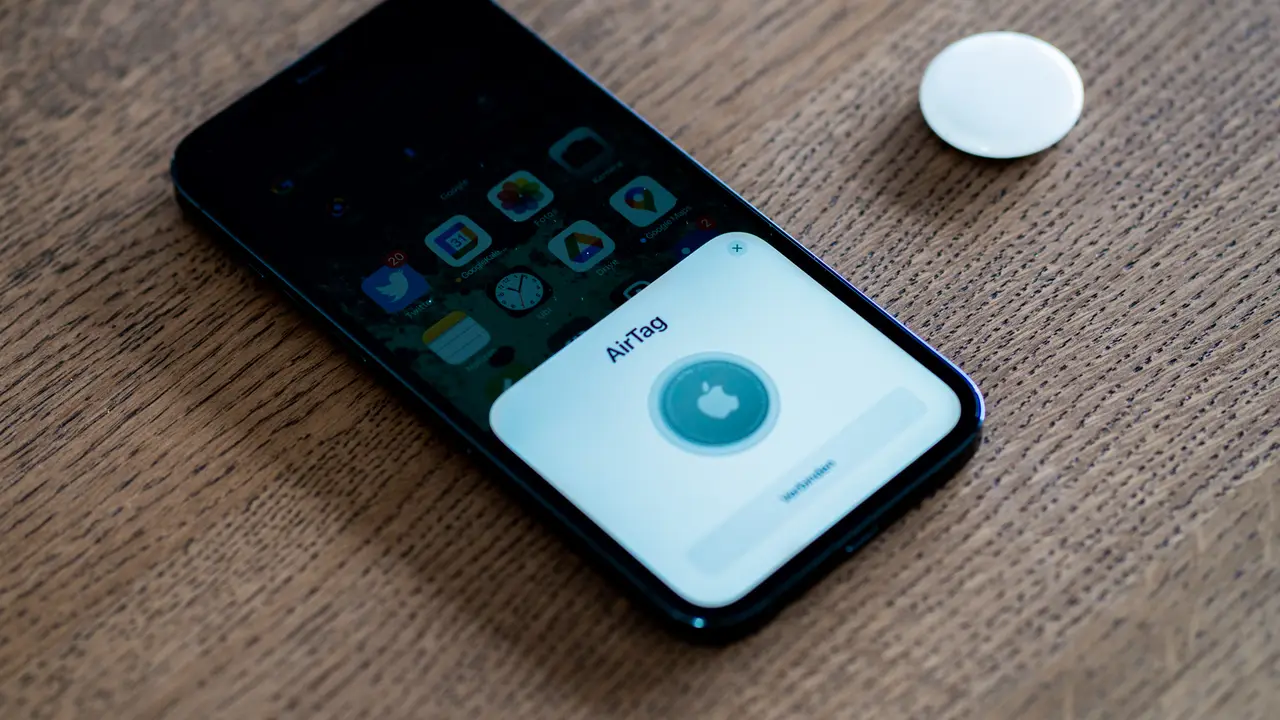
An AirTag is the easiest way to stop losing your keys, bag, or luggage, and at $29 each (or $99 for a four-pack) it is the cheapest peace of mind Apple sells. Drop one in, pair it with your iPhone, and the roughly billion-device Find My network helps you locate it almost anywhere, with Precision Finding guiding you to the exact spot when you are close. Setup takes under a minute, but the details that follow, battery life, attachment, and the anti-stalking system, are what separate a tracker you trust from one you forget about.
Quick answer
To set up an AirTag, pull the plastic tab to wake the battery, hold the AirTag next to your unlocked iPhone, and tap Connect when the prompt slides up. Name the item, tap Done, and it appears under the Items tab in the Find My app. From there you can see it on a map, play a sound, or tap Find Nearby for Precision Finding (on iPhone 11 or later with the Ultra Wideband chip) to walk straight to it. The whole pairing takes under a minute.
Key takeaways
- Pairing is automatic: hold the AirTag near your unlocked iPhone and tap Connect.
- Turn on Bluetooth, Location Services, and Find My before you start.
- Precision Finding guides you to the exact location with distance and direction on iPhone 11 and later.
- The Find My network locates an AirTag through any of roughly a billion nearby Apple devices.
- Apple's anti-stalking alerts warn you if an unknown AirTag is traveling with you.
Before you pair
Confirm three settings are on: open Settings, enable Bluetooth, then under Privacy and Security turn on Location Services, and make sure Find My has location access. Your iPhone also needs iOS 14.5 or later, though you will want a current iOS 26 build for the latest Find My features. With those ready, peel the plastic tab off the AirTag to activate the battery. You will hear a short chime confirming it powered on.
Worth knowing before you commit: an AirTag has no hole for a keyring. The bare tag is a smooth disc, so most people buy a $10 to $40 keyring holder or loop, or slip the tag into a luggage pocket. Apple's own leather and silicone accessories are pricey; third-party holders from Belkin, Spigen, and Nomad work fine.

Pair the AirTag
- Hold the AirTag near your unlocked iPhone and wait for the Connect prompt to appear.
- Tap Connect.
- Choose a name from the list (Keys, Bag, Luggage) or pick Custom Name with an emoji.
- Tap Continue, then Done.
- The AirTag now appears under the Items tab in the Find My app.
If no prompt appears, open Find My, tap Items, tap Add, choose Add AirTag or Other Item, and follow the steps. A prompt that never shows up usually means Bluetooth is off, the iPhone is locked, or the AirTag is already paired to another Apple ID (a common issue with secondhand tags, which the seller must remove from their account first).
Locate a lost item
Open Find My, tap Items, and select the item to see its last known location and timestamp on the map. When you are nearby, tap Find Nearby (Precision Finding) and your iPhone shows the distance and direction with an on-screen arrow, vibrating and brightening as you close in. Tap Play Sound to make the AirTag chime if it is hidden under cushions or in a bag. If the item is genuinely lost, toggle Lost Mode, which locks the AirTag to your account and lets a finder who taps it with any NFC phone see your contact details.
Here is how the location methods compare so you know which one applies in a given situation:
| Method | Range | Requires | Best for |
|---|---|---|---|
| Map location | Anywhere on Find My network | Any nearby Apple device | Item left across town or in transit |
| Play Sound | Bluetooth range (~30 ft) | iPhone near the tag | Keys under the couch cushions |
| Precision Finding | ~30 ft, line of sight | iPhone 11 or later (UWB) | Pinpointing the exact spot in a room |
| Lost Mode | Anywhere | Finder with any NFC phone | A tag you may have dropped in public |
Tip
Precision Finding needs an iPhone with the Ultra Wideband (U1 or U2) chip, meaning iPhone 11 or newer (the iPhone SE is excluded). On older iPhones you still get the map location and the Play Sound feature, just without the turn-by-turn arrow.
Battery and maintenance
An AirTag runs on a single CR2032 coin cell that Apple rates for about a year of typical use. When it gets low, Find My shows a low-battery warning next to the item. Replacement is tool-free: press down and twist the stainless steel back counterclockwise, swap the cell (positive side up), and twist it closed. Avoid CR2032 batteries with a bitterant coating, a safety additive on some child-resistant cells that can prevent good electrical contact and stop the AirTag working.
Privacy and anti-stalking
Apple built in real protections against AirTags being used to track people, and they have tightened over time. If an unknown AirTag is found moving with you over a period of time, your iPhone alerts you with an "Item Found Moving With You" notification. You can then make it play a sound, see a map of where it has been with you, and read instructions to disable it by removing the battery. AirTags separated from their owner also chime on their own after 8 to 24 hours. On Android, Google's "Unknown tracker alerts" (built into Android 6.0 and later) detect AirTags too, and Apple publishes a standalone Tracker Detect app for older Android phones. If you ever get one of these alerts and cannot find a logical explanation, treat it seriously; do not ignore it.
To round out protecting your devices and accounts, set up Stolen Device Protection on iPhone, and if you rely on Apple Watch alongside your iPhone, see setting up sleep tracking on Apple Watch.
What to do right now
If you just unboxed an AirTag, run through this in order:
- Confirm Bluetooth, Location Services, and Find My are all enabled in Settings.
- Pull the plastic tab and wait for the activation chime.
- Hold it near your unlocked iPhone and tap Connect, then name the item.
- Attach it with a keyring holder or tuck it into the bag or case you want to track.
- Open Find My, tap the item, and test Play Sound and Find Nearby so you know they work.
- If you bought it used and it will not pair, ask the seller to remove it from their Apple ID.
Frequently asked questions
Do I need an iPhone to use an AirTag?
Yes. AirTags are set up and tracked through the Find My app on an iPhone or iPad. They rely on Apple's ecosystem and do not work as a standalone tracker for Android.
How far can an AirTag be tracked?
There is no fixed range. An AirTag is found whenever any nearby Apple device on the Find My network detects it and anonymously relays its location, so in busy areas it can be located far from you.
What is Precision Finding?
It is the close-range mode that uses Ultra Wideband to show exact distance and direction to your AirTag with an on-screen arrow. It requires a compatible iPhone; older models still get map location and sound.
Will an AirTag warn someone if I use it to track them?
Yes. Apple's anti-stalking system alerts iPhone users if an unknown AirTag travels with them, Android phones get the same warning through Google's unknown tracker alerts, and the AirTag itself chimes after being separated from its owner for 8 to 24 hours. AirTags are meant for your own belongings, not people.
How long does the AirTag battery last and how do I replace it?
About a year on the user-replaceable CR2032 coin cell. When Find My shows a low-battery warning, press and twist the steel back counterclockwise, drop in a fresh CR2032 (positive side up), and twist it shut. Skip batteries with a bitter anti-swallowing coating, which can block contact.
Can I attach an AirTag to my keys without a holder?
Not directly, since the tag has no keyring hole. You will need an inexpensive holder, loop, or case (roughly $10 to $40), or simply drop the bare tag into a bag pocket or wallet slot.