Phishing-Resistant MFA: Set Up Security Keys to Stop Account Takeover
SMS codes and push prompts can be phished and replayed. FIDO2 security keys cannot. Here's how to set them up and which accounts to protect first.
Not all multi-factor authentication is created equal. The six-digit code texted to your phone and the "approve sign-in?" push notification can both be phished, intercepted, or fatigued out of you. Phishing-resistant MFA, FIDO2 security keys and passkeys, cannot, because it ties your login cryptographically to the real website and never hands over a secret an attacker can replay. In 2026, with account-takeover attacks dominated by adversary-in-the-middle phishing kits, this is the single highest-leverage upgrade you can make.
Quick answer
Phishing-resistant MFA means FIDO2 hardware security keys (like YubiKeys, roughly $25 to $55) and passkeys: both tie your login cryptographically to the real site's origin, so a fake page gets nothing it can replay even if you are fully tricked. SMS codes, email OTPs, and push approvals are not phishing-resistant and fall to adversary-in-the-middle kits. Set it up by registering two keys plus offline recovery codes before you remove weaker methods, and protect your email first, since it resets every other password.
Key takeaways
- Phishing-resistant MFA uses cryptography bound to the real site's origin, so a fake login page gets nothing it can reuse, even if you are fully tricked.
- The strongest options are FIDO2 hardware security keys (like YubiKeys) and passkeys; both rely on a challenge-response that phishing kits and adversary-in-the-middle attacks cannot intercept.
- Weaker MFA, SMS codes, email OTPs, and push approvals, protects against password reuse but falls to modern phishing, SIM-swapping, and MFA-fatigue attacks.
- A YubiKey costs roughly $25, $55 and is widely considered one of the best security investments you can make per dollar.
- The one place passwordless setups go wrong is recovery, always register a backup key or save recovery codes before you remove weaker methods.
Why your current MFA may not be enough
Turning on any MFA is a big step up from a password alone, it stops the credential-stuffing attacks that reuse leaked passwords. But the common forms have a shared weakness: they rely on a shared secret you can be tricked into revealing.
- SMS and email codes can be phished. An attacker's fake login page asks for the code, you type it, they relay it to the real site in real time. SMS is also vulnerable to SIM-swapping.
- Push approvals fall to "MFA fatigue", the attacker spams approval prompts until a tired or confused user taps "approve."
- Adversary-in-the-middle phishing kits automate all of this, proxying the entire login including the second factor.
Phishing-resistant MFA removes the shared secret entirely. A FIDO2 key or passkey performs a cryptographic challenge-response tied to the website's real origin. If you are on a look-alike phishing domain, the key simply will not produce a valid response, there is nothing to phish, intercept, or replay.
Warning
If your most important accounts are protected only by SMS codes, a convincing phishing page can still take them over in real time. Phishing-resistant MFA is the only category that survives a user who has been fully tricked.
The methods, ranked
For practical purposes, three tiers cover the landscape:
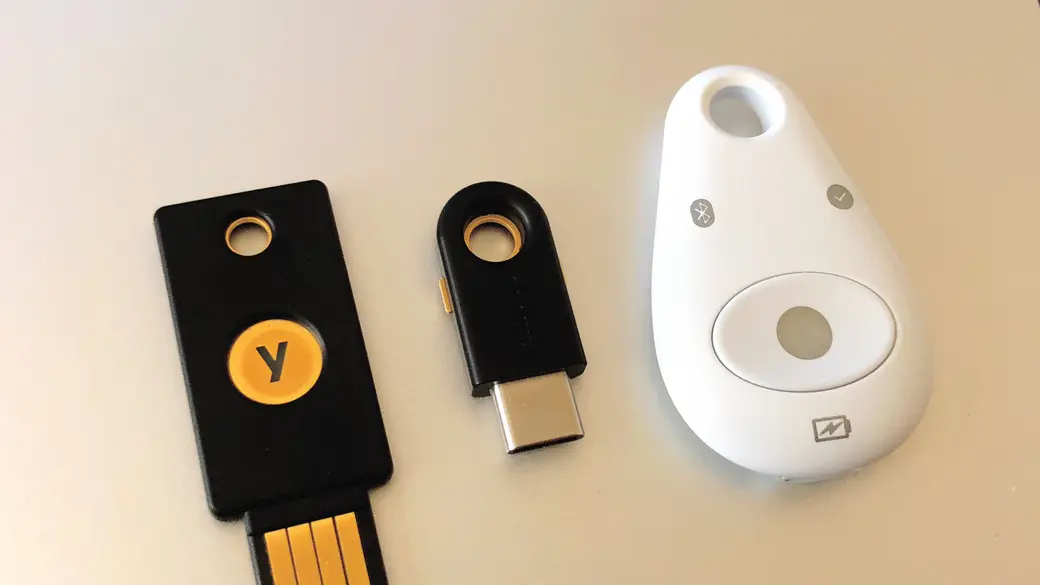
- FIDO2 hardware security keys, a physical key (USB-A, USB-C, NFC, or Lightning) you tap or insert to authenticate. The gold standard: the secret never leaves the key, and it is bound to the site origin. Best for high-value accounts and people who want the strongest possible protection.
- Passkeys, the same FIDO cryptography, but the credential is stored on your phone, laptop, or in a synced password manager and unlocked with biometrics. Phishing-resistant and far more convenient, with the trade-off that the credential syncs through a cloud account. We cover setup in depth in our guide to setting up passkeys.
- Authenticator-app codes (TOTP), better than SMS, but still a shared secret that can be phished in real time. A reasonable fallback, not phishing-resistant.
Here is how the common methods compare on the attacks that actually matter:
| MFA method | Phishing-resistant | Survives AiTM kits | Best for |
|---|---|---|---|
| FIDO2 hardware key | Yes | Yes | Highest-value accounts |
| Passkey | Yes | Yes | Everyday accounts, convenience |
| Authenticator app (TOTP) | No | No | Fallback above SMS |
| Push approval | No | No | Better than nothing, fatigue risk |
| SMS / email code | No | No | Last resort only |
How to set up a security key
The flow is similar across major services. The key principle is to register two keys, a primary and a backup, before you turn off weaker methods, so a lost key never locks you out.
- Buy two FIDO2 keys. Get a primary and a backup, ideally with connectors that match your devices (USB-C and NFC cover most setups). Two keys is the rule, not a luxury.
- Go to your account's security settings. Find the two-step verification or security-key section for the account you are protecting.
- Register the primary key. Choose "add security key," insert or tap it when prompted, and give it a name you will recognize.
- Register the backup key the same way, then store it somewhere safe and separate from the first.
- Save recovery codes offline. Print them or store them in your password manager as a break-glass option.
- Only now, downgrade weaker methods. Once two keys and recovery codes are in place, remove SMS as a factor where the service allows it.
Tip
Register the backup key at the same sitting as the primary. The most common passwordless lockout happens when someone sets up one key, loses it, and discovers they never added a second. Two keys, every time.
Which accounts to protect first
You do not have to convert everything at once. Protect the accounts whose compromise would cascade, in this order:
- Your email. Email resets every other password, so it is the master key. Protect it first.
- Your password manager and cloud storage. They hold the keys to everything else.
- Financial accounts, banking, brokerage, payment apps.
- Identity providers and work SSO, if your employer supports security keys. This is where phishing-resistant MFA blocks the credential-theft that kicks off corporate breaches.
- Social media and shopping, which attackers love for fraud and resale.
This sequencing matters because attackers chain accounts: take the email, reset everything else. Locking the email with a security key breaks the chain at its strongest link.
Why this matters more than ever in 2026
The threat landscape has converged on exactly the attack phishing-resistant MFA defeats. The big 2026 breach campaigns repeatedly started with credential phishing, tricking an employee into surrendering SSO credentials, often through adversary-in-the-middle kits that proxy the second factor too. We saw it in the Salesforce OAuth supply-chain attacks and across the education-sector breaches. A FIDO2 key would have produced nothing usable on the attacker's fake page.
Regulation is catching up to the evidence. Frameworks including NYDFS, PCI DSS, and updated HIPAA guidance now expect phishing-resistant MFA for administrative and remote access. CISA has long urged it as the baseline for organizations serious about reducing account-takeover risk. The technology is mature, the keys are cheap, and the attack it stops is the one actually being used against people right now.
Frequently asked questions
What is the difference between a passkey and a hardware security key?
Both use the same phishing-resistant FIDO cryptography. A hardware key is a separate physical device where the secret never leaves the key. A passkey stores the credential on your phone, laptop, or synced password manager, unlocked with biometrics, more convenient, with the trade-off that it syncs through a cloud account. Many people use passkeys for everyday accounts and hardware keys for their most critical ones.
What happens if I lose my security key?
This is exactly why you register two keys and save recovery codes before removing weaker methods. With a backup key, you authenticate with it, then add a replacement for the lost one. Without a backup, you fall back to recovery codes. The lockout risk comes entirely from skipping the backup step.
Are security keys worth it for a regular person?
Yes, especially for your email and financial accounts. A FIDO2 key costs around $25, $55 and defeats the real-time phishing that ordinary MFA cannot. For the accounts that would do the most damage if taken over, it is among the best security purchases per dollar available.
Can I still keep SMS as a backup?
You can, but it reintroduces the weakest link, anyone who phishes or SIM-swaps the SMS code bypasses your strong keys. Prefer a second hardware key and offline recovery codes as your fallback, and remove SMS where the service allows it.
Sources
Sources & further reading
- cisa.gov/resources-tools/resources/implementing-phishing-resistant-mfa
- infisign.ai/blog/what-is-phishing-resistant-mfa
- 1kosmos.com/resources/blog/modern-authentication-trends-beyond-traditional-mfa-2026
- livingsecurity.com/blog/phishing-resistant-mfa-guide
- miniorange.com/blog/multi-factor-authentication-mfa-best-practices/